I have been ruminating on Kevin Kelly’s book What Technology Wants for a week or so. I think his proactionary principle is helpful for educators to think about (check our my posting on January 11). Another insightful observation he makes has to do with the digital divide.
Basically, Kelly argues that technologies begin as the toys of the rich. When technology is new and expensive, we see a “divide” between the “have’s” and the “have-not’s.” The digital divide that occupied educators’ attention is a recent example. Kelly notes, however, that it is those with the resources to be first adopters who give the technology a road test. These users pay for the research and development that allows for the good uses to be separated from the silly or unnecessary or cumbersome uses.
Once the good uses are identified and refined and once the production methods (both designs and manufacturing) have been developed and refined while producing the expensive (and less than optimal) initial versions of the technology, it becomes more widely available. This phenomenon has been seen with digital information technologies: Desktops and laptops were expensive, and they evolved quickly as processing capacity and storage and networking were refined.
Now, we see that the number of cell phones in the world is approaching 70% of the world population. It appears that the “good” information technology is not the desktop or the laptop (or even the net book), rather it is the Internet-capable phone.
Educators have a new problem: Now, everyone (or nearly everyone) has a cell phone or smart phone. The problem of access has evaporated, and now we face the opposite problem.
And we are unprepared.
Thursday, January 20, 2011
Wednesday, January 19, 2011
Web 1.0, 2.0, 3.0, Semantic web... Trends and Titles...
The question of “what is the future of the web?” has been asked around my school recently... here is my take on the history and the future...
We are all familiar with the Web1.0 transition to Web 2.0 . Web 1.0 was the first “generation” of sites where content providers posted and “net-surfers” consumed. Web 2.0 started when we (that is the collective group of World Wide Web users) started creating content. eBay feedback, Amazon recommendations, Facebook, Blogger... any space where you log on and “post” content is Web 2.0.
Web 3.0 is generally used to describe “cloud computing,” where we (again any user with an account) uses applications provided on a web site. Google Docs and all of the other online apps systems are familiar examples.
We are also starting the hear about the semantic web. This is more difficult to define, and when one reads about it, we see tautologies and meaningless descriptions and links back to to other descriptions (is that a hyper-tautology?). Here is my understanding of what the semantic web will do:
First, we need to recognize that human language contains (a) what we say-- the syntax, and (b) what we mean-- the semantics. Sometimes these are in agreement-- we say what we mean; sometimes these aren’t in agreement-- we use double speak, euphemisms, and otherwise take poetic license.
So, designers of the semantic web seek to create search algorithms that are based on our semantics as well as our syntax.
Whenever I see the Bing commercials in which someone starts with a term and within seconds the search has turned into something far different, I see the motivation for the semantic web. Although the divergent search results portrayed in the Bing commercials are based on our syntax, they are not based on semantic.
Just one person's take on the terms that are kicking around...
We are all familiar with the Web1.0 transition to Web 2.0 . Web 1.0 was the first “generation” of sites where content providers posted and “net-surfers” consumed. Web 2.0 started when we (that is the collective group of World Wide Web users) started creating content. eBay feedback, Amazon recommendations, Facebook, Blogger... any space where you log on and “post” content is Web 2.0.
Web 3.0 is generally used to describe “cloud computing,” where we (again any user with an account) uses applications provided on a web site. Google Docs and all of the other online apps systems are familiar examples.
We are also starting the hear about the semantic web. This is more difficult to define, and when one reads about it, we see tautologies and meaningless descriptions and links back to to other descriptions (is that a hyper-tautology?). Here is my understanding of what the semantic web will do:
First, we need to recognize that human language contains (a) what we say-- the syntax, and (b) what we mean-- the semantics. Sometimes these are in agreement-- we say what we mean; sometimes these aren’t in agreement-- we use double speak, euphemisms, and otherwise take poetic license.
So, designers of the semantic web seek to create search algorithms that are based on our semantics as well as our syntax.
Whenever I see the Bing commercials in which someone starts with a term and within seconds the search has turned into something far different, I see the motivation for the semantic web. Although the divergent search results portrayed in the Bing commercials are based on our syntax, they are not based on semantic.
Just one person's take on the terms that are kicking around...
Tuesday, January 18, 2011
Cool Tools...
In reading Kevin Kelly's What Technology Wants, I was intrigued by the term technium which he coined to describe the complex of humans and the tools we have created. Kelly is one of a number of recent author who have argued that we humans and our technologies cannot be separated.
In further exploring his idea, I have been messing about on Kelly's web site. On one section, Kelly lists "Cool Tools," and it does indeed list all sorts of cool technologies. Ostensibly, this section is a good time waster or maybe a good place to find gift ideas for the person who has everything. On further reflection, however, the creativity on display on this page is incredible. We know that something happens to students in the years between when they enter school and when they leave school that results in a terrific (make that horrific) loss of creativity.
Perhaps pointing out creative tools such as are identified here and encouraging students to include them as elements in their writing or otherwise use them in their academic life can reduce this loss of creativity.
In further exploring his idea, I have been messing about on Kelly's web site. On one section, Kelly lists "Cool Tools," and it does indeed list all sorts of cool technologies. Ostensibly, this section is a good time waster or maybe a good place to find gift ideas for the person who has everything. On further reflection, however, the creativity on display on this page is incredible. We know that something happens to students in the years between when they enter school and when they leave school that results in a terrific (make that horrific) loss of creativity.
Perhaps pointing out creative tools such as are identified here and encouraging students to include them as elements in their writing or otherwise use them in their academic life can reduce this loss of creativity.
Friday, January 14, 2011
Teachers' Domain
In the world of digital media, where students are highly engaged with games and video, Teachers' Domain is an excellent source of media for students. Much of the content is provided by PBS, so there is plenty of very credible and reliable information.
The site provides options to search by content area and media type and the resources are labeled by grade level.
Thursday, January 13, 2011
Fish Kids...
This interesting game came across my inbox recently... the publishers suggest it is for grade 3-8... I am not sure 8th graders would like it, but certainly the 5th and 6th graders I have taught would find this engaging.
Fish Kids
Fish Kids
Tuesday, January 11, 2011
Proactionary Principle
At this point, we must assume that technology is a permanent part of our schools (after all technology has been a part of humanity forever). Educators do have a responsibility to engage with technology and our technology-using populations. Many have adopted the precautionary principle which means that they will adopt no technology until it proves to be harmless. Ostensibly, that allows one to be careful and to proceed only when the path is known. In reality, the precautionary principle results in one never adopting any technology. Although that may be many educators' goal for adopting the precautionary principle, it is a position that is increasingly difficult to justify.
I have recently finished Kevin Kelly's What Technology Wants (look for more of my reactions here once I get a chance to reread the more provocative sections). He recommends that humans are better served by the proactionary principle which suggests that we adopt new technologies but that we immediately begin evaluating the technology and that we continue to assess and evaluate throughout our use of any technology. All of this video is worth watching, but at about 13 minutes, Kelly talks about his proactionary principle.
Monday, January 10, 2011
The World is Changing...
Educators complain about you people's infatuation with online video... this online video explains both why it is so appealing and how it can be used in a positive manner.
Friday, January 7, 2011
Are we better off?
I am reading Kevin Kelley’s What Technology Wants right now. Kelley is a founding editor of Wired magazine and has been writing about technology for decades. I have just finished the section in which he considered the question Are we better off with technology? He concludes that in important measures such as access to health-giving technologies (such as clean water, sanitation, and antibiotics) and access to information, modern technologies have benefited populations around the world. Kelley is not a technology Utopian, he recognizes that environmental damage does result from the mining and energy production necessary to build and operate his computer, but he concludes that there are more benefits than consequences resulting from the technologies.
This got me thinking (as I walked to work)... Are educators better off with information technologies? We could all do a cost benefit analysis of computer-rich education. We could contrast the access to information that we now have with the information overload that we all experience. We could contrast the ability to interact globally with the loss of real-life personal interaction. We could contrast the opportunity to interact “24/7” with the potential to bully “24/7.” We could contrast the access to vast academic resources with the loss of students’ opportunity to build in wood shops and cook in kitchens in schools.
After reflecting on these during my morning walk, I have concluded that we are better off in our schools because of technology. We have access to more information and the ability to analyze that information and the ability to create more and disseminate our creations to a level never. I have also concluded, however, that we are not using computer technology for the greatest advantage for our children.
We will only see really effective technology-rich schools when the academic learning becomes authentic and engaging (which technology can help us do) when domain knowledge is effectively managed (which technology can help us do) and when information is effectively shared within and among communities (which technology can help us do). Once we have those schools, then we can get to the important work of encouraging more painting and running and building and performing that results in the true human development.
This got me thinking (as I walked to work)... Are educators better off with information technologies? We could all do a cost benefit analysis of computer-rich education. We could contrast the access to information that we now have with the information overload that we all experience. We could contrast the ability to interact globally with the loss of real-life personal interaction. We could contrast the opportunity to interact “24/7” with the potential to bully “24/7.” We could contrast the access to vast academic resources with the loss of students’ opportunity to build in wood shops and cook in kitchens in schools.
After reflecting on these during my morning walk, I have concluded that we are better off in our schools because of technology. We have access to more information and the ability to analyze that information and the ability to create more and disseminate our creations to a level never. I have also concluded, however, that we are not using computer technology for the greatest advantage for our children.
We will only see really effective technology-rich schools when the academic learning becomes authentic and engaging (which technology can help us do) when domain knowledge is effectively managed (which technology can help us do) and when information is effectively shared within and among communities (which technology can help us do). Once we have those schools, then we can get to the important work of encouraging more painting and running and building and performing that results in the true human development.
Thursday, January 6, 2011
Worldwide Telescope
Every time I turn around, there seems to be a new tool that makes me wish I was teaching science again. With Worldwide Telescope, users can access a telescope... yup stars, galaxies, nebula, the whole universe on your computer. This is a Microsoft-supported site and requires SilverLight, the MS browser plug-in, but the install is worth it.
http://www.worldwidetelescope.org/Home.aspx
Wednesday, January 5, 2011
Gamestar Mechanic
http://gamestarmechanic.com/
Tuesday, January 4, 2011
Internet Privacy
As 2010 came to an end,several commentators were focusing on our privacy in the digital age. Most agree that the development of deep packet inspection and a business and regulatory climate amenable to unrestricted use of such technologies (and the information gleaned from the technologies) has for the most part ended any reasonable expectation of privacy.
For educators, privacy concerns are an important for several reasons:
First, we work with sensitive populations and with sensitive information about those populations. One sure way to maintain privacy when online is to be very careful about what we post when online. Of course, the real threat to privacy is not the actions we take (such as sending and email or posting online) but the actions that are taken without our knowledge.
Second, we have a duty to ensure our students are prepared to fully participate in the technology-rich communication world. Awareness of the potential hazards and potential use and misuse of information about them is necessary today and into the future.
Here are links to some of the recent stories that have piqued my interest...
Morning Edition
BBC
Scientific American
For educators, privacy concerns are an important for several reasons:
First, we work with sensitive populations and with sensitive information about those populations. One sure way to maintain privacy when online is to be very careful about what we post when online. Of course, the real threat to privacy is not the actions we take (such as sending and email or posting online) but the actions that are taken without our knowledge.
Second, we have a duty to ensure our students are prepared to fully participate in the technology-rich communication world. Awareness of the potential hazards and potential use and misuse of information about them is necessary today and into the future.
Here are links to some of the recent stories that have piqued my interest...
Morning Edition
BBC
Scientific American
Monday, January 3, 2011
Body Browser
In the middle of December, Google released a demo test version of BodyBrowser. This does for the human body what GoogleEarth did for the planet. Basically, users get a 3D body, and the skin, bones, cardiovascular, nervous systems (oh yeah, the major internal organs also) can be seen. The body can be rotated and labels toggled on and off.
I have only been able to get BodyBrowser to work on Macintosh computers by downloading and installing Mozilla Firefox 4 Beta. For many users, it may be best to be aware this will be rolling out soon. My colleagues and I have been having fun brainstorming lists of features we would like to see... we expect links to descriptions of organs soon... perhaps a menu of diseases that can afflict the model with a mouse click. I am wondering how Google will make money with BodyBrowser, but I know science teachers will enjoy it for as long as it is available.
Wednesday, December 15, 2010
Something to think about over the holidays....
I plan to take a couple of weeks off writing my blog over the holidays...
Here is something both exciting and disconcerting to think about... there are 100 Ways to Use FaceBook in your classroom...
http://www.onlinecollege.org/2009/10/20/100-ways-you-should-be-using-facebook-in-your-classroom/
Maybe we need to start thinking about if we open this up on our filters?!?!?!?
(I actually spoke with a principal recently and they opened FB in their school... the school is still standing... classes continue... no major injuries in the first few months!)
Here is something both exciting and disconcerting to think about... there are 100 Ways to Use FaceBook in your classroom...
http://www.onlinecollege.org/2009/10/20/100-ways-you-should-be-using-facebook-in-your-classroom/
Maybe we need to start thinking about if we open this up on our filters?!?!?!?
(I actually spoke with a principal recently and they opened FB in their school... the school is still standing... classes continue... no major injuries in the first few months!)
Tuesday, December 14, 2010
An interesting leak
With all of the discussion related to leaks of sensitive information, I found the following article humorous... but at the same time useful as it illustrates the importance of using complex and "good" passwords. If your password is on this list, you might want to change it!
http://blogs.wsj.com/digits/2010/12/13/the-top-50-gawker-media-passwords/
Monday, December 13, 2010
Make Your Own Animations
There are a number of sites where students (and teachers) can create animations. The idea is simple: add characters, compose dialogue, change camera views, assign expressions to characters... well maybe it is not so simple after all.
These sites require usernames and passwords, and most require users to be over 13. In my classroom we have a small collection of usernames and passwords that are for use by my students. The accounts are associated with email accounts that I can access but that students cannot.
My approach to using this is to let kids "sand box" for a day, learning how to add animations, dialogue, add background sounds and use al of the other controls. Once they have a sense of how to use the program, we start making movies for storytelling.
xtranormal
meemov
These sites require usernames and passwords, and most require users to be over 13. In my classroom we have a small collection of usernames and passwords that are for use by my students. The accounts are associated with email accounts that I can access but that students cannot.
My approach to using this is to let kids "sand box" for a day, learning how to add animations, dialogue, add background sounds and use al of the other controls. Once they have a sense of how to use the program, we start making movies for storytelling.
xtranormal
meemov
Saturday, December 11, 2010
The More Things Change...
The most recent PC World arrived today. I am not as interested in it now that I am not maintaining computers (I only worry about curriculum and instruction!), but as I flipped through the pages, I was struck by the emerging technology featured in the pages... tablet PC, smart phones, HDTV, cloud computing... but also by the familiarity of tech issues... password security, patches to fix hole exposing our computers to hackers, steps to improve the performance of your PC....
Makes me think that we are still in the middle of the transition: Thirty years ago, we were just seeing PC's become mainstream and there were great claims of life-changing information on the horizon. We are still hearing the same claims and still spending time and energy fixing things that it seems should have been fixed by now.
Friday, December 10, 2010
New Math?!?!?!
I have heard TED Talks described as "YouYube for smart people." Given the recent video about math and math education, I think that is an accurate description:
Thursday, December 9, 2010
Wicked Problems
In recent weeks, I have been reading a fascinating collection of articles that were published in the 1970's (and of course some more modern articles); the topic is wicked problems. (Being a New Englander, I immediately connected with idea, although I was severely disappointed when I discovered the authors of the original idea were from California!)
Wicked problems are those in social sciences (including education) in which the science and engineering approaches used by natural scientists use are not useful. Wicked problems share many characteristics, many of which relate to the observation that these are social problems and one's assessment of the solution is affected by one's social context. In education, we know that "how good a teacher you are" depends on one's perspective; and your students, the school board, and the writers of standardized tests may all have different answers and different evidence to support their answers. Other characteristics of wicked problems relate to the many many factors that influence our understanding of the problem, the solutions we create, and our judgements of the solutions.
Education Week asked 11 education leaders to define 21st century learning. There are common themes in their answers, but in reading between the line of the answers, we see that we still have a long way to go if we expect to come to consensus on what schooling should look like in the 21st century. Increasingly, I am coming to the conclusion that we will never come to consensus, and if we avoid looking purposefully at our work and doing the best we can to invent new practices in our schools and classrooms until that consensus in achieved, then we will forever be stuck in 19th century schools.
Wicked problems are those in social sciences (including education) in which the science and engineering approaches used by natural scientists use are not useful. Wicked problems share many characteristics, many of which relate to the observation that these are social problems and one's assessment of the solution is affected by one's social context. In education, we know that "how good a teacher you are" depends on one's perspective; and your students, the school board, and the writers of standardized tests may all have different answers and different evidence to support their answers. Other characteristics of wicked problems relate to the many many factors that influence our understanding of the problem, the solutions we create, and our judgements of the solutions.
Education Week asked 11 education leaders to define 21st century learning. There are common themes in their answers, but in reading between the line of the answers, we see that we still have a long way to go if we expect to come to consensus on what schooling should look like in the 21st century. Increasingly, I am coming to the conclusion that we will never come to consensus, and if we avoid looking purposefully at our work and doing the best we can to invent new practices in our schools and classrooms until that consensus in achieved, then we will forever be stuck in 19th century schools.
Tuesday, December 7, 2010
Online Writing Communities
I am a fan of the several online writing communities that are available for young people. As a Vermonter, I have a particular affinity for the Young Writers' Project, but I am also impressed with Figment that recently went online. The basis organization of these sites is the same and not complicated: members post their writing (usually heavy lots of poetry and short stories), other members respond with (usually) good criticism. The sites also make prompts and contests available.
The one concern that many educators have (reasonably so) is that membership on such sites is restricted to those over 13. Most educators also come up with reasonable workarounds. Perhaps posting students' work with an account used my an adult or by downloading the writing and using it in other venues than the online interaction.
| Visit the site |
| Visit the site |
Monday, December 6, 2010
Technology Stewards
Ettiene Wegner is well-known (along with several of his colleagues) for developing the idea of a Community of Practice (Cop). CoP is based on the idea that a group of people (the community of actively engaged participants) who are connected by a some actions they share in common (the practice) can become a mutually supportive (the sense of community among the participants). A CoP is not usually a formal group, it emerges and grows in an organic manner; if a school principal announces the years’ professional development initiative is to become a CoP, it will not emerge. If a school principal creates the conditions that lead to the emergence of a CoP, then it may happen.
In 2009, Wenger and two colleagues (Nancy White and John Smith) wrote Digital Habits: Stewarding Technology for Communities. The book proposes technology stewards as individuals within a CoP who are responsible (in either a formal way or an informal way) for ensuring that computers and related technology is used in a meaningful way within an organization.
Technology stewards will be familiar to many educators; an excellent example of a technology steward is the teacher who uses computers in hos or her classroom, shares ideas with colleagues, and talks with technology support people to ensure systems are configured to allow for effective use. The signs that a school needs a technology steward may be unfortunately familiar: Systems that we can’t use. Things we want to do, but can’t. Systems well designed and built but not used to their fullest.
The role of the technology steward in a school will be to work to help technologists build systems that meet educators’ needs and to make sure that educators know and use the systems that technologist build.
Learn more about the book
See Ackerman's review of the book here (scroll way down on the pdf file... my review is the last one in the file!)
In 2009, Wenger and two colleagues (Nancy White and John Smith) wrote Digital Habits: Stewarding Technology for Communities. The book proposes technology stewards as individuals within a CoP who are responsible (in either a formal way or an informal way) for ensuring that computers and related technology is used in a meaningful way within an organization.
Technology stewards will be familiar to many educators; an excellent example of a technology steward is the teacher who uses computers in hos or her classroom, shares ideas with colleagues, and talks with technology support people to ensure systems are configured to allow for effective use. The signs that a school needs a technology steward may be unfortunately familiar: Systems that we can’t use. Things we want to do, but can’t. Systems well designed and built but not used to their fullest.
The role of the technology steward in a school will be to work to help technologists build systems that meet educators’ needs and to make sure that educators know and use the systems that technologist build.
Learn more about the book
See Ackerman's review of the book here (scroll way down on the pdf file... my review is the last one in the file!)
Thursday, December 2, 2010
Another programming idea...
For those who are in search of an even easier programming language with which we can give middle schoolers experience writing programs (easier than Processing which appeared here on Dec. 1), I recommend Scratch.
This is also open source (that is free to install and use), and it was developed at MIT from the work of Seymour Papert and LOGO (which started even before Papert in the 1960's!). Anyways, users create programs by dragging blocks that look like Lego's. Programs are run by clicking a green flag (at least this is the usual starting method).
I have colleagues how have used both Scratch and Processing in both formal classes with middle schoolers and as exploratory classes (including after-school clubs).
Visit the Scratch web site.
This is also open source (that is free to install and use), and it was developed at MIT from the work of Seymour Papert and LOGO (which started even before Papert in the 1960's!). Anyways, users create programs by dragging blocks that look like Lego's. Programs are run by clicking a green flag (at least this is the usual starting method).
I have colleagues how have used both Scratch and Processing in both formal classes with middle schoolers and as exploratory classes (including after-school clubs).
Visit the Scratch web site.
Wednesday, December 1, 2010
A Programming Tool
As I watch more and more adults who perceive computers as "black boxes" in which magic happens and over which we have no control (or even understanding), I am convinced we need to give our students experience programming. We need to give every student experience in programming-- the rich white male computer geek as well as all of his classmates regardless of gender, race, or socioeconomic status.
Processing is a relatively easy to use (and open source!) tool for creating animations. It can be installed in a short time and there are online tutorials available that will get middle schoolers writing programs in a matter of minutes (maybe tens of minutes).
Visit the Processing web site
Processing is a relatively easy to use (and open source!) tool for creating animations. It can be installed in a short time and there are online tutorials available that will get middle schoolers writing programs in a matter of minutes (maybe tens of minutes).
Visit the Processing web site
Tuesday, November 30, 2010
Reinvigorate your presentations
For educators, that means we need to continue to learn and use “the newest thing,” if we are going to continue to engage students with the ideas and information we teach. It also means that simply changing the format of a presentation may help students pay more attention.
One tool I have used to update some presentations that were getting tired is Prezi. After creating an account, users can create presentations that follow paths to different sections of a large canvas. Along the path, the user creates content (add text, upload images... typical presentation stuff). Navigating the Prezi (their name for a presentation) involves following the path and zooming in on the content.
Taking a presentation and making it into a Prezi does several things for teachers:
1) You get to revisit the content, update it, add new images, etc.
2) You get a more engaging product for your classroom.
3) You get to work at learning something new!
Visit Prezi
Monday, November 29, 2010
The World Wide Web is almost old enough to vote!
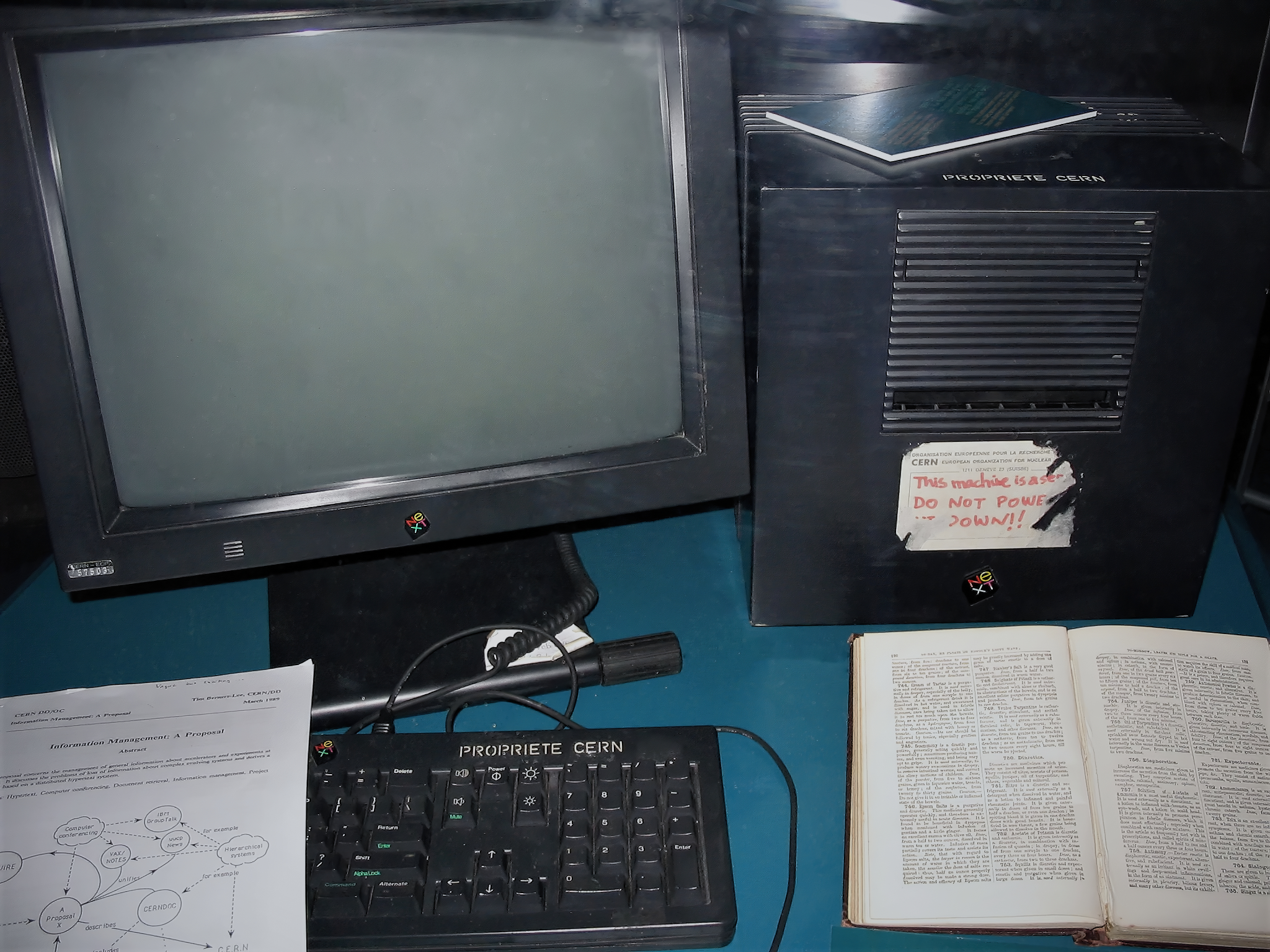
| This images comes from Wikimedia Commons: http://commons.wikimedia.org/wiki/File:First_Web_Server.jpg |
In the December 2010 issue of Scientific American, you can find Tim Berners-Lee’s article entitled “Long Live the Web.” Berners-Lee is now director of the World Wide Web Consortium, but in 1990 he was working at CERN in Eurpe, when he developed the protocols and browsers that have since become the World Wide Web. His article in the new SA is introduced with a startling observation:
The Web is critical not merely to the digital revolution but to our continued prosperity- and even our liberty. Like democracy itself, it needs defending.
In the following pages, Berners-Lee reminds readers of the basic ideas upon which the Web was built, and also points out recent actions that may challenge those ideas.
Universality-- Because all content is based on the same protocols (hyper text markup language at it most fundamental level), any content can be linked to any other content. Consider this: Your middle school soccer team web site is as available on the web as any giant online retailer. Universality is one feature of the web that allows for innovation; anyone can create a service on the web that can then be connected and reconnected by anyone . Berners-Lee suggests that some of the social networks that allow information to be used only within the site is a threat to universality.
Open Standards-- The web is built using protocols and rules that are available to anyone to use without the need to pay anyone or seek any one's permission. Although you are free to create a model in which you use those standards and then charge for access to the model (membership driven web sites for example), you cannot sell the protocols. Berners-Lee uses iTunes as an example of a service that uses the Internet, but not open standards; access to the iTunes store is controlled by Apple.
Net-neutrality-- In recent years there has been a good deal of chatter about the rights of an Internet service provider (ISP) to make deals with content providers to provide preferential service. (Imagine a web where is was easy to get to Amazon, but hard to get to the web site of your favorite local book seller.) Berenrs-Lee points out this is contrary to the concepts of democracy, free-exchange of information, and science that created the web.
Intrusion-- Berners-Lee is very concerned about developments that allow (both technically and politically) for ISP’s to monitor what information you are accessing (once that information has been collected it can be bought and sold as well). So, your employer or your insurance company or your neighbor who does not like you can find out what web sites you (or any one who has access to your connection) visit.
In our schools, we have some responsibility to protect our students and to ensure our web use is for the purposes of our institution. (It should be noted that this post is made on “cyberMonday” the day in which we use our work connections for holiday shopping!) So, we do have some rules and conditions on out web use that are imposed (quite reasonably) by our employers. At the same time, we need to make sure our students are exposed to the fundamental ideas that resulted in the web becoming the resource it is today.
Berners-Lee concludes his article by observing, “[n]ow is an exciting time. Web developers, companies, governments, and citizens should work together openly and cooperatively, as we have done thus far, to preserve the Web’s foundamental principles, as well as those of the Internet, ensuring that the technological protocols and social conventions we set up respect basic human values. The goal of the web is to preserve humanity. We build it now so that those who come to it later will be able to create things that we cannot imagine.”
Sure seems to me that educators have an essential role in ensuring this happens.
The article can be found on the Scientific American web site:

Tuesday, November 23, 2010
Deeper Learning Principles
The sources of advice for educators to consult as the design curriculum and deliver instruction is expanding. In recent weeks, I have been interested in the literature for those who design online learning environments for higher education. Although I have been interested in this field for some time, it was not until I read a Instruction and Technology: Designs for Everyday Instruction that I saw just how informative this could be for K-12 educators.
In 2002, Colleen Carmen and Jeremy Haefner (see the link below) reviewed some of the then-recent research on human learning and articulated Deeper Learning Principles, explaining how these can be addressed through online classrooms. Their work still deserves attention not only because it does identify how online classrooms can be used to support education, but because they identify and define five Deeper Learning Principles:
1) Learning is social: Beyond "cooperative groups" or "having students work together," Carmen and Heafner point out that interaction between students and faculty and among students is key to learning. Feedback is example of social interaction in learning, but they remind us that rich feedback (that middle school educators have been doing for decades) is key.
2) Learning is active: Active learning depends on real-world and complex problems; simply having students "do projects" is not sufficient for active learning.
3) Learning is contextual: Contextual learning includes students' preconceptions and build upon their experiences, and becomes connected to and demonstrated within the students' worlds; as students learn, they add to their frameworks.
4) Learning is engaging: Students are engaged by diverse instruction, high expectations and challenge (but non-threatening!) classrooms.
5) Learning is student-owned: Allowing students to reflect on their experiences, plan for next steps, and organize and apply their learning all promote ownership of learning.
Most good middle school practitioners will see their classrooms as spaces in which these principles are realized. Of course, we sometimes need to be reminded of what we mean by these words, and we need to be able to point those who "talk-the-talk" but do not "walk-the-walk" to scholars who clearly and completely define the vocabulary we use:
Mind over Matter
In 2002, Colleen Carmen and Jeremy Haefner (see the link below) reviewed some of the then-recent research on human learning and articulated Deeper Learning Principles, explaining how these can be addressed through online classrooms. Their work still deserves attention not only because it does identify how online classrooms can be used to support education, but because they identify and define five Deeper Learning Principles:
1) Learning is social: Beyond "cooperative groups" or "having students work together," Carmen and Heafner point out that interaction between students and faculty and among students is key to learning. Feedback is example of social interaction in learning, but they remind us that rich feedback (that middle school educators have been doing for decades) is key.
2) Learning is active: Active learning depends on real-world and complex problems; simply having students "do projects" is not sufficient for active learning.
3) Learning is contextual: Contextual learning includes students' preconceptions and build upon their experiences, and becomes connected to and demonstrated within the students' worlds; as students learn, they add to their frameworks.
4) Learning is engaging: Students are engaged by diverse instruction, high expectations and challenge (but non-threatening!) classrooms.
5) Learning is student-owned: Allowing students to reflect on their experiences, plan for next steps, and organize and apply their learning all promote ownership of learning.
Most good middle school practitioners will see their classrooms as spaces in which these principles are realized. Of course, we sometimes need to be reminded of what we mean by these words, and we need to be able to point those who "talk-the-talk" but do not "walk-the-walk" to scholars who clearly and completely define the vocabulary we use:
Mind over Matter
Monday, November 22, 2010
Read Bill Ivey
Bill Ivey is a friend of NELMS who I have not seen in a few years. We are FaceBook friends, and he posted a link to his blog, specifically his post in which he suggests the familiar calls for education reform are (as Bill puts it) "so close and yet so far." All I can say is "right on," Bill. See what I mean by reading his post:
http://isenet.ning.com/profiles/blogs/so-close-and-yet-so-far
Sunday, November 21, 2010
Finding Tech Help
In the most recent issue of PCWorld, I stumbled upon a column giving business leaders advice on finding good tech support. As I read it, I thought how appropriate the advice is for school leaders as well. (It is also unfortunate that we sometimes need to take this advice when dealing with those who provide tech support in our own buildings!)
The main points of that column that seem of particular importance for education leaders:
1) Look for tech support that focuses on the goals and activities in your building, not just on technology. Surely, there are differences between how we configure servers that must handle a large number of connections in a brief time (think of the connections established in the first few minute or two of a class period!) or a printer that must handle a large number of print jobs in a the last few minutes of class and the server in business that handle a large number of users, but in much different use patterns in business.
Consider also the unpredictable nature of educators' (and students') access needs. We need to be able to connect from many different places and have access to constantly changing information. In business, most users need access to the same resources every day. These are important differences that affect how educators design and maintain our information systems.
2) Make sure the scale of the technology is appropriate for your needs and your budget. Consider wireless Internet access. If your school does not have this yet, there are many ways it can be installed in your school. Managed wireless throughout your school may costs tens of thousands of dollars to install and ongoing maintenance fees (maybe thousands of dollars per year). A wireless access point can plugged into and existing Ethernet network and be configured in a matter of minutes for a couple of hundred dollars (a one-time fee). Of course, the capabilities of these two systems are much different. School leaders must understand the differences and make reasonable decisions.
3) Beware of buzz words and sales people. I am always happy to see school leaders at technology conferences, but I am worried when I see school leaders at technology conferences. What worries me most is when I see school leaders wandering through the vendors at technology conferences.
I understand technology is not within the area of expertise of many school leaders. I understand it changes too fast for many adult minds to understand (this is not in any way denigrating school leaders, it is a statement supported by much recent research). School leaders must look at this state of affairs, and find trusted and reasonable translators: someone who can communicate technology terms and products into education-friendly terms and someone who can translate educational needs into technology terms.
The main points of that column that seem of particular importance for education leaders:
1) Look for tech support that focuses on the goals and activities in your building, not just on technology. Surely, there are differences between how we configure servers that must handle a large number of connections in a brief time (think of the connections established in the first few minute or two of a class period!) or a printer that must handle a large number of print jobs in a the last few minutes of class and the server in business that handle a large number of users, but in much different use patterns in business.
Consider also the unpredictable nature of educators' (and students') access needs. We need to be able to connect from many different places and have access to constantly changing information. In business, most users need access to the same resources every day. These are important differences that affect how educators design and maintain our information systems.
2) Make sure the scale of the technology is appropriate for your needs and your budget. Consider wireless Internet access. If your school does not have this yet, there are many ways it can be installed in your school. Managed wireless throughout your school may costs tens of thousands of dollars to install and ongoing maintenance fees (maybe thousands of dollars per year). A wireless access point can plugged into and existing Ethernet network and be configured in a matter of minutes for a couple of hundred dollars (a one-time fee). Of course, the capabilities of these two systems are much different. School leaders must understand the differences and make reasonable decisions.
3) Beware of buzz words and sales people. I am always happy to see school leaders at technology conferences, but I am worried when I see school leaders at technology conferences. What worries me most is when I see school leaders wandering through the vendors at technology conferences.
I understand technology is not within the area of expertise of many school leaders. I understand it changes too fast for many adult minds to understand (this is not in any way denigrating school leaders, it is a statement supported by much recent research). School leaders must look at this state of affairs, and find trusted and reasonable translators: someone who can communicate technology terms and products into education-friendly terms and someone who can translate educational needs into technology terms.
Thursday, November 18, 2010
Poetry...
So I have spent my morning with a teacher and his English classes... they are beginning a unit on poetry. Our idea was to use YouTube videos of poets (we choose to start with Billy Collins and Taylor Mali) reading their own work.
The teacher told me that kids seemed more interested and the students told us they were more interested in poetry with this introduction. We didn't make poets out of any that were not already, but we did use technology to engage kids to a greater extent than we would have without technology.
We are counting that as a small success... I'll take those everyday.
Everyone's favorite poem of the day:
The teacher told me that kids seemed more interested and the students told us they were more interested in poetry with this introduction. We didn't make poets out of any that were not already, but we did use technology to engage kids to a greater extent than we would have without technology.
We are counting that as a small success... I'll take those everyday.
Everyone's favorite poem of the day:
Monday, November 15, 2010
Technology Acceptance
For the last two years or so, I have been looking at and thinking about the Technology Acceptance Model (TAM) and wondering how it can be applied to K-12 education. Basically, TAM says that technology that users perceive to be easy to use, useful, and used by others who are doing the same task will be more used.
Seems kind of a "no-brainer," that we should try to design our computer systems in schools to be easy to use, and useful, and widely used if we expect every teacher to use it (I know that seems redundant... but stick with me). Unfortunately, educators seem to have missed the boat on this one. The research in business and industry is full of thousands of articles in which TAM was used to measure people's perceptions of ICT systems. The research in education has maybe a few hundred.
I have been working to develop a tool that we can use to measure technology acceptance in K-12 educators (actually, I have been working on a slightly different model, but the idea is the same). Check out the details, including a draft of my current survey here... please note the survey has not been validated, but it can be used for action research... if anyone is interested in doing a pilot study and perhaps validating the survey, drop me a line!)
Seems kind of a "no-brainer," that we should try to design our computer systems in schools to be easy to use, and useful, and widely used if we expect every teacher to use it (I know that seems redundant... but stick with me). Unfortunately, educators seem to have missed the boat on this one. The research in business and industry is full of thousands of articles in which TAM was used to measure people's perceptions of ICT systems. The research in education has maybe a few hundred.
I have been working to develop a tool that we can use to measure technology acceptance in K-12 educators (actually, I have been working on a slightly different model, but the idea is the same). Check out the details, including a draft of my current survey here... please note the survey has not been validated, but it can be used for action research... if anyone is interested in doing a pilot study and perhaps validating the survey, drop me a line!)
Saturday, November 13, 2010
Research-- Let's use the term only when appropriate!
Recently I attended a meeting of a committee comprised of school board members, administrators, teachers, and a few community members. Our purpose is not important; I want to recount what happened and comment on how we need to be very careful about what we call research and how we handle professional information in today's digital world.
First, looking something up on the Internet is not "doing research." Research is what we do when we have an unanswered question. Research includes gathering data, analyzing that data, and suggesting an answer to the question. All steps are conducted in a systematic and reasonable manner, and all decisions are recorded so they (and our conclusions) can be evaluated. We all check facts and get ideas be "Googling," but that is a much different information task than researching.
Second, why do we assume someone else's answers are better than our own and why do we spend hours (and hours and hours) looking for someone else's answers to our questions when we can generate our own answers (based on our education, our experience, and our knowledge of our local situation) in far less than time than is necessary to generate our own answers?
The task of our committee is important, but pretty ordinary. With the insight of our diverse committee, we could have generated our list of questions in far less time than it took for us to review the bland questions printed by the administrator who took the leadership role for generating our list of questions. I would hope any educator would be able to generate a list of questions that once answered would be provide information essential to evaluating important aspects of school life.
By relying on the Internet for answers to questions that we are in the best position to answer, we are both accepting the same superficial answers that have too broad an appeal and we are devaluing our own experience and skill.
For our task, the committee needed a set of questions to evaluate some aspect of our school. Similar questions are used in schools all over then place and our task is a common one for education communities. When it came time to begin building our list of questions, a central office administrator stated "I did some research today, and this is what I found." At that point she distributed a collection of question lists she had printed from the Internet. The pages were complete with the poor appearance common when web pages are printed (the advertisements embedded in the pages were perhaps the best appearing sections of the hard copies she distributed) and the URL's and a date and time stamp (suggesting this "research" had been done minutes before the meeting started) were all on the photocopies handed out.On first glance, this seems a reasonable action to take: We need questions and others have written similar questions, why not find what they have done? Well, I think this situation raises two important issues about professional educators and their relationship to information today.
First, looking something up on the Internet is not "doing research." Research is what we do when we have an unanswered question. Research includes gathering data, analyzing that data, and suggesting an answer to the question. All steps are conducted in a systematic and reasonable manner, and all decisions are recorded so they (and our conclusions) can be evaluated. We all check facts and get ideas be "Googling," but that is a much different information task than researching.
Second, why do we assume someone else's answers are better than our own and why do we spend hours (and hours and hours) looking for someone else's answers to our questions when we can generate our own answers (based on our education, our experience, and our knowledge of our local situation) in far less than time than is necessary to generate our own answers?
The task of our committee is important, but pretty ordinary. With the insight of our diverse committee, we could have generated our list of questions in far less time than it took for us to review the bland questions printed by the administrator who took the leadership role for generating our list of questions. I would hope any educator would be able to generate a list of questions that once answered would be provide information essential to evaluating important aspects of school life.
By relying on the Internet for answers to questions that we are in the best position to answer, we are both accepting the same superficial answers that have too broad an appeal and we are devaluing our own experience and skill.
Friday, November 12, 2010
Rewired-- finished for now
Here is the last of the series in which I have commented on Rosen's 11 recommendations for educators:
10) "Recognize that the Internet provides a global perspective." Sure, this cannot be denied but it is accurate (as with all modern information technology) if we use it... we all have great connectivity, but if we connect with no one, we must wonder what it the point? (Please comment with your descriptions of how you do connect globally...)
11) Teacher who want to rewire have lots of support on the Internet. Need more evidence? Contact me... gary@hackscience.net ... visit my web site... http://www.hackscience.net
10) "Recognize that the Internet provides a global perspective." Sure, this cannot be denied but it is accurate (as with all modern information technology) if we use it... we all have great connectivity, but if we connect with no one, we must wonder what it the point? (Please comment with your descriptions of how you do connect globally...)
11) Teacher who want to rewire have lots of support on the Internet. Need more evidence? Contact me... gary@hackscience.net ... visit my web site... http://www.hackscience.net
Thursday, November 11, 2010
Rewired- continued again again
One more time with my take on Rosen's recommendations for educators... if you have seen the posts... he makes 11 recommendations for educators of the iGeneration... in earlier posts (scroll down), I commented on 1-3, then 4-6.
7) "iGeners may be media savvy, but they aren't media literate." The duty of educators to help youngsters become skeptical and demanding (in terms of reliability and credibility) users of information takes on greater importance in the digital world. Unfortunately, many educators shy away from helping students out become critical users of digital content because the educators feel unprepared to evaluate that which they do not feel comfortable managing and manipulating.
8) "We can no longer talk about the three 'R's.'" Rosen adds a fourth R-- realistic technology. That R is not necessary; his point that we can no longer focus on traditional media and ignore the technology-rich culture around us if we have any hope of being relevant to the iGeneration.
9) "Actively seek out support from techie students and teachers." In recommendation #9, Rosen makes two important points for educators: First, educators must be active in their learning; sitting back waiting for someone to tell you what to do or what to use is not going to result in your becoming a confident and competent user of computers. Second, we are surrounded by "experts" (defined as someone who can show you how to do something new and useful) and educators need to take advantage of this expertise.
7) "iGeners may be media savvy, but they aren't media literate." The duty of educators to help youngsters become skeptical and demanding (in terms of reliability and credibility) users of information takes on greater importance in the digital world. Unfortunately, many educators shy away from helping students out become critical users of digital content because the educators feel unprepared to evaluate that which they do not feel comfortable managing and manipulating.
8) "We can no longer talk about the three 'R's.'" Rosen adds a fourth R-- realistic technology. That R is not necessary; his point that we can no longer focus on traditional media and ignore the technology-rich culture around us if we have any hope of being relevant to the iGeneration.
9) "Actively seek out support from techie students and teachers." In recommendation #9, Rosen makes two important points for educators: First, educators must be active in their learning; sitting back waiting for someone to tell you what to do or what to use is not going to result in your becoming a confident and competent user of computers. Second, we are surrounded by "experts" (defined as someone who can show you how to do something new and useful) and educators need to take advantage of this expertise.
Wednesday, November 10, 2010
Rewired- continued again
To continue with Rosen's 11 recommendations for educators (you may want to scroll down to read the previous posts on Rewired):
4) "For most teens and pre-teens, writing is a chore tantamount to an afternoon in the dentist's chair." Rosen's reasons we (educators) insist our is the only method of writing and that the shorthand they use when they communicate is ignored by educators. His observations seem spot-on, his reasoning is sound; let's develop strategies for helping young people become skilled communicators, and if that means we swallow hard and allow text shortcuts in rough drafts, so be it. But let's insist they do make the step to academically polished writing too!
5) "This generation believe in feedback and lots of it." Rosen leaves unanswered the obvious question of how the teacher with 100 students gives constant feedback... maybe we seek help... maybe we help all students learn how to give and take good feedback... hey haven't good middle school teachers been doing this forever?
6) "While Baby-Boomers believe in 'process,' including frequent meetings to discuss issues, iGeners believe in 'product' over process." I think I am firmly in the iGeneration on this one. As I have become a user of ICT, I find I am less interested in talking about how we are going to do what we are going to do, and more interested in what we create (although I also find the process is becoming product as well-- I think that is because learning how to manipulate information and technology is important to me-- skills have become a product with value). My wife suggests my growing aversion to meetings is that I am becoming a disagreeable old man!
(check back for more of Rosen's recommendations, complete with Ackerman's commentary soon)
4) "For most teens and pre-teens, writing is a chore tantamount to an afternoon in the dentist's chair." Rosen's reasons we (educators) insist our is the only method of writing and that the shorthand they use when they communicate is ignored by educators. His observations seem spot-on, his reasoning is sound; let's develop strategies for helping young people become skilled communicators, and if that means we swallow hard and allow text shortcuts in rough drafts, so be it. But let's insist they do make the step to academically polished writing too!
5) "This generation believe in feedback and lots of it." Rosen leaves unanswered the obvious question of how the teacher with 100 students gives constant feedback... maybe we seek help... maybe we help all students learn how to give and take good feedback... hey haven't good middle school teachers been doing this forever?
6) "While Baby-Boomers believe in 'process,' including frequent meetings to discuss issues, iGeners believe in 'product' over process." I think I am firmly in the iGeneration on this one. As I have become a user of ICT, I find I am less interested in talking about how we are going to do what we are going to do, and more interested in what we create (although I also find the process is becoming product as well-- I think that is because learning how to manipulate information and technology is important to me-- skills have become a product with value). My wife suggests my growing aversion to meetings is that I am becoming a disagreeable old man!
(check back for more of Rosen's recommendations, complete with Ackerman's commentary soon)
Monday, November 8, 2010
Rewired- continued
Last week, I posted some thoughts on Larry Rosen's book Rewired... I indicated the book deserves more of our attention, so...
Chapter 9 of his book is entitled "Rewiring Education," and as the title suggests, he gives educators his advice. In this post, I will begin to summarize (and comment on) his 11 recommendations:
1) "The iGeneration is a creative multimedia generation." Yup, this is very obvious... YouTube, iTunes, are sites these people visit... all the time. The question for educators is to decide how to recognize this and use it to our advantage. When I was in middle school, movies in class meant nap time. That is not true anymore (if we chooses and use video well).
2) "Education must respect and mine this generation of 'content creators.'" Writing papers? Sure, we need to help kids get really good at that, but we also need to help them get good at creating media... and maybe we can even get kids to write if we use the media with wisdom.
3) This generation thrives on social interactions, but not just talking amongst themselves in class or at recess." This (I believe) is the one defining difference between "adults" and the iGeneration; and it is also the one that has potential to cause the most conflict in schools. I am not going to suggest that we should allow students full use of their cell phones during class, but I am going to suggest we develop strategies for accommodating this characteristic of the iGeneration in a non-disruptive manner. [My three rules are simple and students seem to appreciate it: 1) When someone is talking to the class, either adult or student is talking to the group, no phones. 2) When we are working on project-- yes, it easier for me as I am a computer teacher who has a project-based curriculum-- you may read messages. 3) When doing #2 do it without drawing attention to yourself or talking about the message.]
(to be continued...)
Chapter 9 of his book is entitled "Rewiring Education," and as the title suggests, he gives educators his advice. In this post, I will begin to summarize (and comment on) his 11 recommendations:
1) "The iGeneration is a creative multimedia generation." Yup, this is very obvious... YouTube, iTunes, are sites these people visit... all the time. The question for educators is to decide how to recognize this and use it to our advantage. When I was in middle school, movies in class meant nap time. That is not true anymore (if we chooses and use video well).
2) "Education must respect and mine this generation of 'content creators.'" Writing papers? Sure, we need to help kids get really good at that, but we also need to help them get good at creating media... and maybe we can even get kids to write if we use the media with wisdom.
3) This generation thrives on social interactions, but not just talking amongst themselves in class or at recess." This (I believe) is the one defining difference between "adults" and the iGeneration; and it is also the one that has potential to cause the most conflict in schools. I am not going to suggest that we should allow students full use of their cell phones during class, but I am going to suggest we develop strategies for accommodating this characteristic of the iGeneration in a non-disruptive manner. [My three rules are simple and students seem to appreciate it: 1) When someone is talking to the class, either adult or student is talking to the group, no phones. 2) When we are working on project-- yes, it easier for me as I am a computer teacher who has a project-based curriculum-- you may read messages. 3) When doing #2 do it without drawing attention to yourself or talking about the message.]
(to be continued...)
Sunday, November 7, 2010
Brain Rules
John Medina wrote Brain Rules in 2008, and I had moved on to a few other books and ideas in the last couple of years, but then he published Brain Rules for Baby earlier this year, so there was some chatter about his original book on the 'net. That chatter reminded me of how informative his book is and I figured I should contribute to the chatter as well.
In this book, Medina reviews the recent brain research and articulates 12 rules that parents, educators, and employers need to understand if they are to design home, classrooms, and workplaces that are friendly to brains and that allow brains to work to their highest potential.
The rules are simple and well-known to most middle school educators. The publisher has made some excellent resources available on the book web site, including an excellent summary of the rules.
In this book, Medina reviews the recent brain research and articulates 12 rules that parents, educators, and employers need to understand if they are to design home, classrooms, and workplaces that are friendly to brains and that allow brains to work to their highest potential.
The rules are simple and well-known to most middle school educators. The publisher has made some excellent resources available on the book web site, including an excellent summary of the rules.
Thursday, November 4, 2010
Rewired
Larry Rosen’s Rewired addresses a number of “hot topics” of interest to today’s educator. Because his work focuses in particular on young adolescents, the book is especially important for middle school educators. He does consider a number of themes (a sufficient number that I intend to focus on the book in multiple blog entries), including multiasking and wireless mobile devices (WMD’s).
An interview with Larry Rosen that was broadcast on National Public Radio is available here.
Multitasking is the mythic capability of young people (and others) to be able to perform more than one task at a time. A youngster who is instant messaging a friend on his or her computer, carrying on a text message conversation with another, and listening to music all while doing homework is multitasking. (So is his or her parent who is talking on the cell phone while driving.) Several years ago, there was some suggestion that young people where able to multitask better than adults; more recent research has questioned youngsters’ ability to do more than one task at a time. Rosen looks takes a closer at the evidence and suggests that youngsters are not multitasking, but they are quickly task-switching. He also concludes that educators must recognize this facts of young people’s lives and must develop strategies for accommodating this into expectations (he argues that “multitasking” youngsters will still accomplish tasks equally too youngsters who do not, but that but will take longer).
Rosen does use the acronym WMD to describe wireless mobile devices, which includes the cell phones, BlackBerries, iPhones, and similar devices students carry today. The emotional resonance of the terms is not list on the audience and Rosen does suggest these are having profound effect on how humans access information and how humans interaction. Again, Rosen recognizes the need for educators to develop strategies for surviving the effects of WMD’s on schools.
An interview with Larry Rosen that was broadcast on National Public Radio is available here.
Multitasking is the mythic capability of young people (and others) to be able to perform more than one task at a time. A youngster who is instant messaging a friend on his or her computer, carrying on a text message conversation with another, and listening to music all while doing homework is multitasking. (So is his or her parent who is talking on the cell phone while driving.) Several years ago, there was some suggestion that young people where able to multitask better than adults; more recent research has questioned youngsters’ ability to do more than one task at a time. Rosen looks takes a closer at the evidence and suggests that youngsters are not multitasking, but they are quickly task-switching. He also concludes that educators must recognize this facts of young people’s lives and must develop strategies for accommodating this into expectations (he argues that “multitasking” youngsters will still accomplish tasks equally too youngsters who do not, but that but will take longer).
Rosen does use the acronym WMD to describe wireless mobile devices, which includes the cell phones, BlackBerries, iPhones, and similar devices students carry today. The emotional resonance of the terms is not list on the audience and Rosen does suggest these are having profound effect on how humans access information and how humans interaction. Again, Rosen recognizes the need for educators to develop strategies for surviving the effects of WMD’s on schools.
Tuesday, November 2, 2010
10 Commands for Digital Age
As I walked out the door this morning, I heard the announcer on Vermont Public Radio give a promotional announcement for a program to be aired later in the day... the topic sounded intriguing, but I was in the middle of class when the programmed aired, so I did the next best thing... I Googled the bits of the announcement that I recalled, and found the book that went immediately to the top of my “to read” list.
Douglas Rushfoff’s Program or Be Programmed, seems to raise important issues for those of us who care about the future of society and those of us who see a role for humans (all humans) in deciding our individual and collective future. I am intrigued by both the argument he makes in the YouTube video promoting his book and in his 10 Commands for the Digital Age that show up in the table of contents of his book:
I. TIME
Do Not Be "Always On"
II. PLACE
Live in Person
III. CHOICE
You May Always Choose “None of the Above”
IV. COMPLEXITY
You Are Never Completely Right
V. SCALE
One Size Does Not Fit All
VI. IDENTITY
Be Yourself
VII. SOCIAL
Do Not Sell Your Friends
VIII. FACT
Tell the Truth
IX. OPENNESS
Share, Don’t Steal
X. PURPOSE
Program or Be Programmed
This sure seems to be the outline for any good “healthy living in the digital world” lesson for middle school classrooms. I am hopeful that others interested in the issues raised by Rushoff (or who have read his book) continue the discussion...
Monday, November 1, 2010
VoiceThread
Blogging is a familiar activity today: The blogger posts to the blog (in text or pictures or video) and visitors to the blog read (notice that verb) the post and write (notice that verb also) responses... the conversation on a blog is all text-based.
VoiceTread (http://www.voicethread.com) is like all other blogging tools, except that it makes it far easier to post and respond with audio. The blogger posts text, a picture, or video and then records the post. Others can then post responses using their computer microphones. Other options for posting (including via phone) are available, but I have had the best luck with simply using audio posts and responses.
The usual caveats about using care when exposing children (especially those under 13 years) to these sites apply here and the usual note that the site may be be blocked by school Internet filters applies as well. VoiceThread is worth exploring, however, as it will engage students in a way that traditional blogging may not.
VoiceTread (http://www.voicethread.com) is like all other blogging tools, except that it makes it far easier to post and respond with audio. The blogger posts text, a picture, or video and then records the post. Others can then post responses using their computer microphones. Other options for posting (including via phone) are available, but I have had the best luck with simply using audio posts and responses.
The usual caveats about using care when exposing children (especially those under 13 years) to these sites apply here and the usual note that the site may be be blocked by school Internet filters applies as well. VoiceThread is worth exploring, however, as it will engage students in a way that traditional blogging may not.
Subscribe to:
Posts (Atom)